Waypoint TrackerThe 3D waypoint arrow and quest finder for WoW Forever
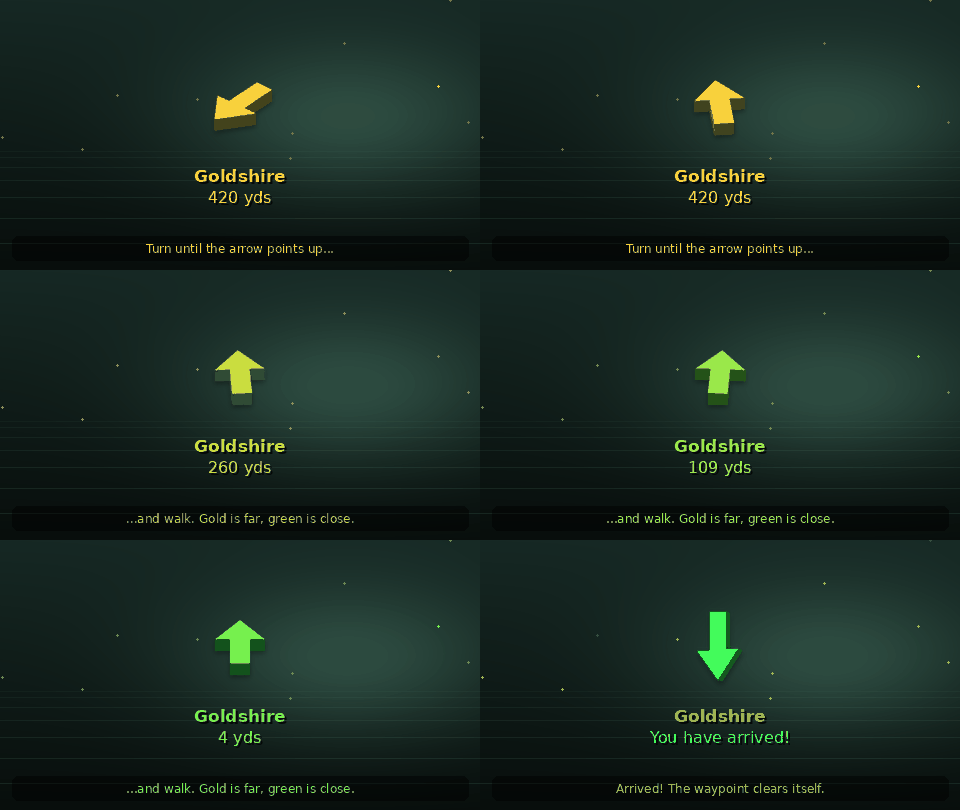
Set a waypoint. Follow the arrow. That's it. Type /way 42 65, click the world map or search any quest, NPC or item by name, and a 3D arrow over your character points the way with the distance and time to arrive. It turns from gold to green as you close in, and clears itself when you arrive.
Free and open source · Version 1.1.1 · Client 1.60.1 · 9 languages · Works with TomTom-style addons
Illustrated arrow demo
Quest: Find Your Way
Quest giver: every adventurer who has ever run in circles looking for a quest mob
"You there! You've got coordinates from a guide, a guildmate or a map, and no idea which way to run. Take this arrow. It points where you need to go and turns green when you're close. Nothing else to learn."
Objectives
Set a waypoint: open the window with /wp, or just type /way 42 65
Follow the arrow until it turns green
Arrive. The waypoint clears itself and the arrow moves on to the next one.
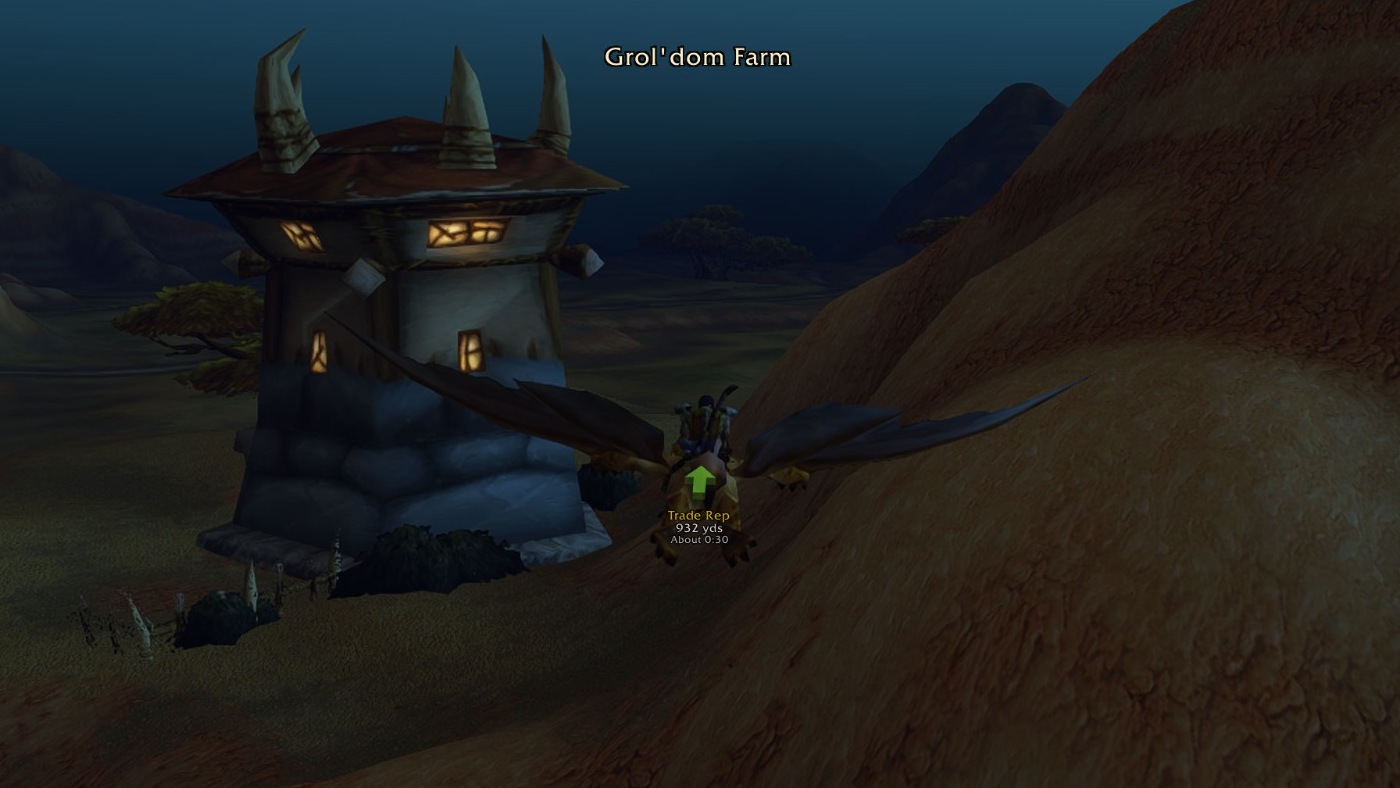
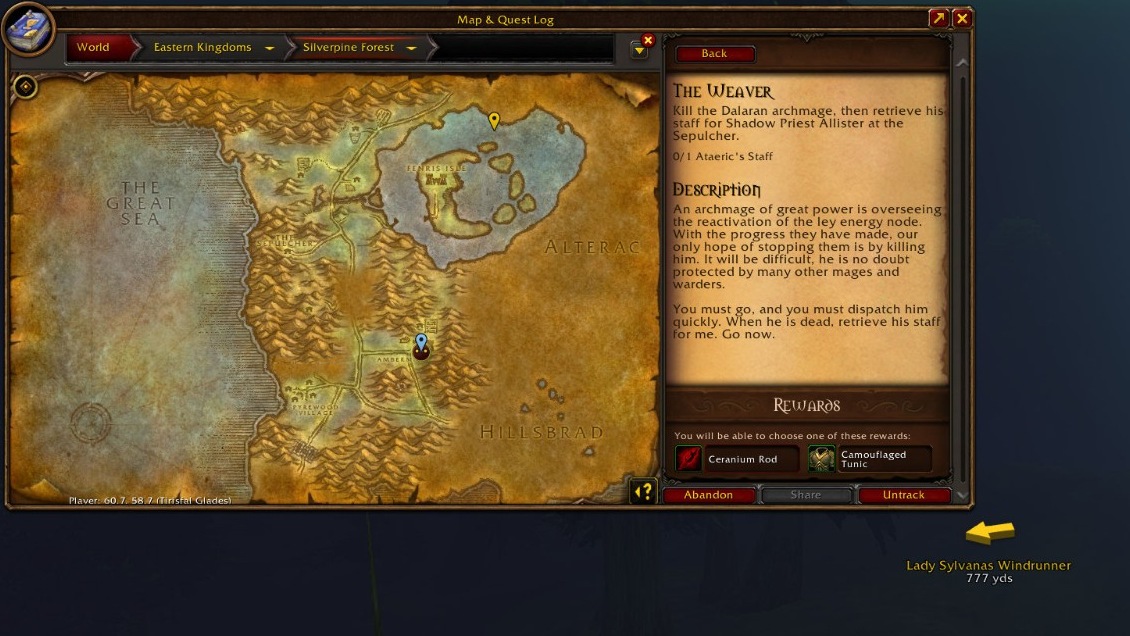
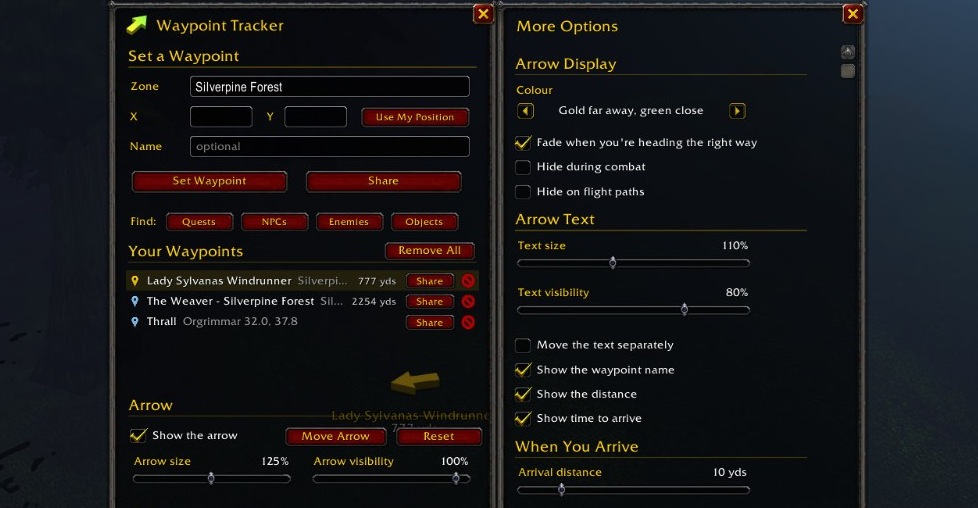
Three real screenshots from WoW Forever. Open any image at full size.
Flying near Grol'dom Farm: “Trade Rep”, distance and estimated travel time beneath the arrow. Full-size arrow screenshot.Waypoint pins on the Silverpine Forest world map; the arrow points toward Lady Sylvanas Windrunner, 777 yds away. Full-size map screenshot.Coordinate fields, Find buttons and Share buttons beside saved waypoints, with display, text and arrival settings in More Options. Full-size window screenshot.
Features
Everything the addon does, as loot.
Arrow of Finding
Binds to account
TrinketUnique
Equip: A 3D arrow over your character points to your waypoint, with its name, distance and time to arrive underneath.
Equip: Turns from gold to green as you get close. Never catches mouse clicks, so right-click to attack always works.
"It points where you need to go. Nothing else to learn."
Tome of Finding
Off HandBook
Equip: Search quests, NPCs, enemies, objects and items, then double-click to point the arrow at the closest one.
Use: Find the nearest mailbox, innkeeper, flight master, repair, bank or auction house.
"Includes WoW Forever's new zones."
Zone Search Scroll
ConsumableNever runs out
Use: Set a waypoint with /way coordinates, a zone list that filters as you type, a quest or place name, or Ctrl + right-click on the world map.
Use: Typos, accents and capitals don't matter. Pasted coordinates like 45.2 67.8 split into X and Y.
Map Pin of Sharing
Miscellaneous
Use: Send any spot, or where you stand, to Party, Raid, Guild, Say or a whisper as a clickable map pin. No waypoint needed.
"Works for friends without the addon too."
Chime of Arrival
Trinket
Equip: On arrival, plays a sound, clears the waypoint and points to the next closest one.
Equip: When you die, points to your corpse, then back to your waypoint once you're alive.
Cloak of Fewer Settings
BackCloth
Equip: A few basic settings. Colour styles, fading, hiding in combat or on flight paths, map pins, metres and more wait behind Show more options.
Equip: Moves with the game's Edit Mode, with a spot for each layout.
Spyglass of Plunder
New · Beta
Treasure hunt/wp treasure
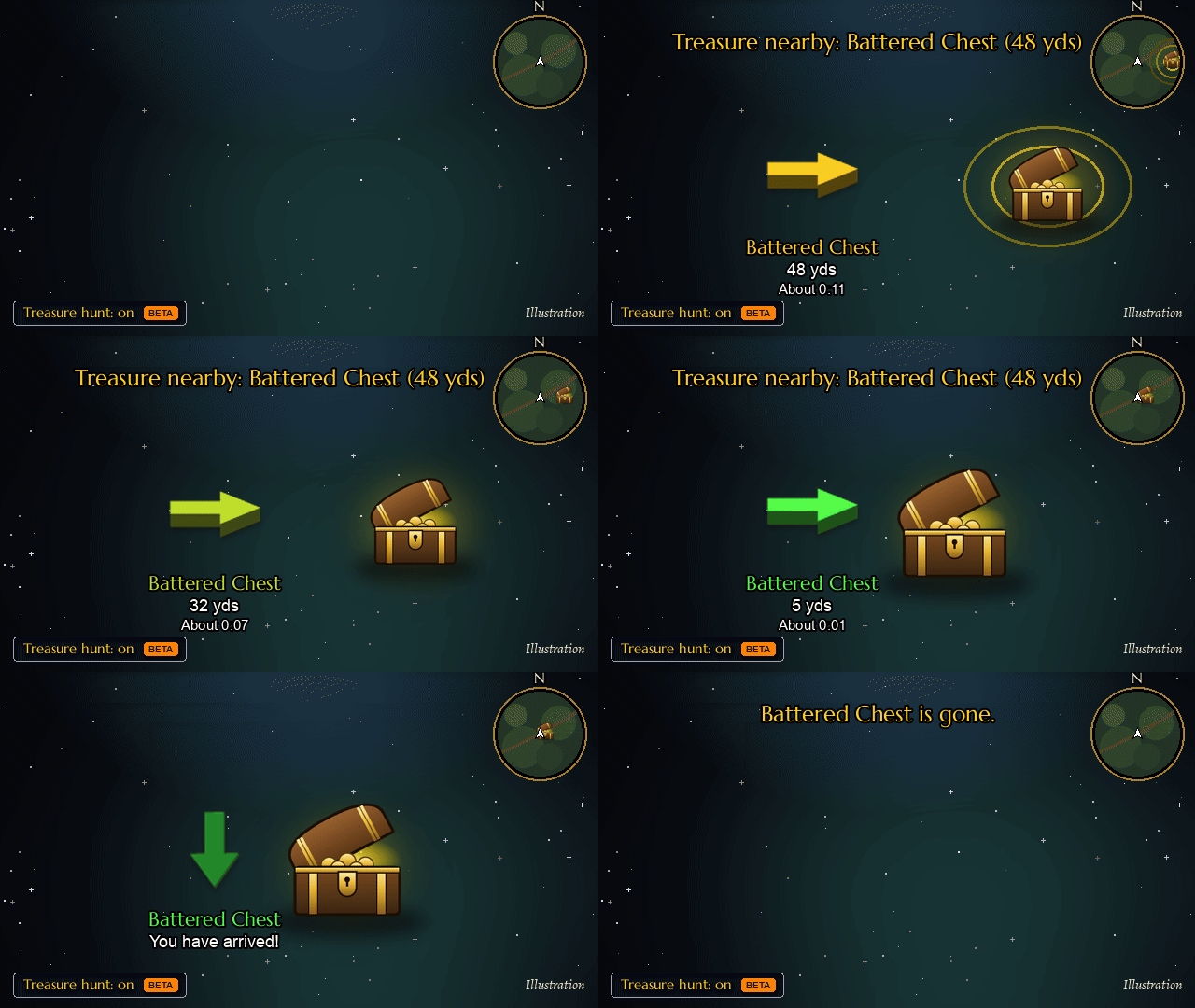
Equip: Pings you the moment a chest, a rare spawn or another marker the game shows appears near you: a sound, a message on screen and a blinking taskbar icon.
Equip: Points the arrow straight at it, follows a rare that wanders, and lets go once it's taken, killed or gone. Rares someone else is already fighting are left out.
Use: Walks you from one known chest spawn to the next while nothing has appeared.
"On a busy server, the first one there gets the loot."
Treasure hunt Beta
Beta
Illustration, drawn with the addon's own arrow.
Treasure hunt (beta)
Tick Treasure hunt in the window or type /wp treasure. When a chest, a rare or an event the game marks appears near you, you hear a ping, see it on screen, and the taskbar icon blinks if you're in another window.
The arrow points straight at it, follows a rare that wanders, skips rares someone else is already fighting, and lets go once it's taken, killed or gone. Optional: Lead me to known chest spots.
Press Quests, NPCs, Enemies or Objects in the window, or type /wp find hogger. Search as you type, then double-click a result and the arrow points to the closest spot. Quests show who gives them, where the objectives are and where to hand them in. Items show what drops or sells them.
Find covers the classic world and WoW Forever's new zones (Mount Hyjal, Riverglades, Zephras Isle, Shen'dralas), including about 3,000 quests and 6,600 items beyond the classic world, and every item, flight path and town in the WoW Forever game files in nine languages. It learns while you play: the NPCs and enemies around you with their titles (search blacksmith to find every blacksmith you've seen), what vendors sell, quest givers and what drops from what you loot. What you see in the game always wins.
What it learns stays on your computer and keeps only what's new. Found a spot that's off? Press Wrong spot? Correct it. To help everyone, press Share discoveries and paste the text into a GitHub issue; what's new goes into a coming update.
How to install Waypoint Tracker
CurseForge
In the CurseForge app choose World of Warcraft, then the Forever game version, search for Waypoint Tracker and click Install.
Download WaypointTracker-v1.1.1.zip and unzip it into Interface\AddOns in your WoW Forever folder. You get two folders, WaypointTracker and WaypointTracker_Data.
During the beta the folder is World of Warcraft\_classic_beta_\Interface\AddOns. Then start the game, or type /reload, and type /wp.
Chat commands
[You]:/way 42 65
Waypoint in your current zone.
[You]:/way Elwynn Forest 42 65 Goldshire
Waypoint in any zone, with a name. Part of a zone name is enough, in any client language.
[You]:/way hogger
Goes straight to something by name, or searches Find.
[You]:/wp share
Puts where you are in the chat box as a map pin, ready to send.
[You]:/wp find blacksmith
Searches quests, NPCs, enemies, objects and items.
Say: /wp
/wp
Open or close the window.
/wp here or /wayb
Waypoint where you're standing.
/way #37 42 65
Waypoint by map ID, for guide writers.
/wp closest or /cway
Point to the closest waypoint.
/wp clear · /wp clear all
Remove the arrow's waypoint, or all of them.
/wp treasure
Turn treasure hunt on or off.
/wp list · /wp arrow · /wp help
List waypoints, show or hide the arrow, list every command.
Key bindings are under Key Bindings > AddOns, and the settings under Options > AddOns > Waypoint Tracker.
Questions
How do I set a waypoint in WoW Forever?
Install Waypoint Tracker, then type /way 42 65 in chat for your current zone, or /way Westfall 56.3 47.1 Sentinel Hill for another zone. You can also type /wp to open the window, hold Ctrl and right-click the world map, or search a quest, NPC or object by name with /wp find. A 3D arrow then points the way.
How do I find an NPC, quest giver or vendor in WoW Forever?
Type /wp find and a name (or the title of an NPC you have seen, like blacksmith), or press NPCs in the Waypoint Tracker window. Double-click a result and the arrow points to the closest spot. Find covers the classic world and WoW Forever's new zones, quests and items, and adds the NPCs you see while you play.
How do I install addons for WoW Forever?
Use the CurseForge app (World of Warcraft, Forever) or Wago, or download the zip from GitHub and unzip it into Interface\AddOns in your WoW Forever folder. During the beta that is World of Warcraft\_classic_beta_\Interface\AddOns. Waypoint Tracker gives you two folders: WaypointTracker and WaypointTracker_Data.
Is Waypoint Tracker free?
Yes. It is free and open source under the MIT licence, with readable code, no ads and nothing to buy.
Does Waypoint Tracker send my data anywhere?
No. What the addon learns while you play stays in its saved file on your computer. You share it only if you choose to: press Share discoveries in Find and paste the text into a GitHub issue.
Which languages does Waypoint Tracker support?
Nine: English, German, French, Spanish, Portuguese, Russian, Korean, Simplified Chinese and Traditional Chinese. It follows your game client's language, and zone names in /way work in every language.
Can Waypoint Tracker alert me when a chest or rare spawns?
Yes. Turn on Treasure hunt in the window or type /wp treasure. When a chest, a rare or another marker the game shows appears near you, you hear a ping, the arrow points at it, and the waypoint goes away once it's taken, killed or gone.
Is there a TomTom for WoW Forever?
Waypoint Tracker fills that role: the same /way commands and a 3D arrow with distance and time to arrive, plus Find. Addons written for TomTom, including "Send to TomTom" buttons, send their waypoints to its arrow with no changes. If TomTom itself is installed, Waypoint Tracker leaves /way to it and /wp keeps working.
Is there a rare scanner or treasure finder for WoW Forever?
Waypoint Tracker has one built in, new in 1.1 and still in beta. Treasure hunt (/wp treasure) pings you when a chest, rare or rare elite, or event marker appears near you, points the arrow straight at it, follows rares that wander and skips rares someone else is already fighting. Lead me to known chest spots walks you between known chest spawns while nothing is up.
Can other addons send waypoints to Waypoint Tracker?
Yes. Quest guides, treasure maps and other addons that send waypoints to an arrow send them straight to Waypoint Tracker, with nothing to set up.